Thursday, July 12, 2007

The customer service of new AT&T for Bellsouth customer

new_att_logo.jpgAfter AT&T took over Bellsouth at the beginning of this year, we can see a lot changes now. Not only the company name, sign we can see the change, so do the customer service representative we have to deal with. Today, I decided to call Bellsouth or AT&T to complain my DSL modem charge and it took me longer than I thought.

Right after the merge, I could not wait for AT&T's $10 per month deal then I ordered at-that-time Bellsouth DSL service for $32 per month. When I was ordering, I was told I could get the DSL modem for free after mail-in-rebate if I signed up the service from the web. But after nearly half year, I did not see any rebate form showed up in my mail box but $7.5 charge for the modem showed up for my every month's bill statement. I called the "BellSouth" a couple times, and each time the rebate specialist told me he/she would put my rewarding in the system since I was eligible for this rebate, and it would take 6-8 weeks to process. But after a few month's waiting, what I received were two postcards saying that they could not give me the rebate because I did not purchase the Bellsouth FastAccess service. What?

Enough is enough, I decided to call them again as for their last chance to correct my problem before I complain to BBB.

When I dialed the phone number 1-800-507-9130 which was on the post card, and I was told that this phone number was not in service anymore and the message asked me to dial another phone number 1-866-342-4271. Apparently it is an AT&T phone number which is the result of closing former Bellsouth reward calling center (poor Bellsouth guys).

The lady on the phone was polite but she could not help me further, since (according to what she said) this is a incoming calling center and she could not verify my service. So she asked me to call another phone number 1-888-321-2375, and ask me to ask them to call her (or her colleagues) by using 3-way conference call. So that they can verify my service on the line.

Well, I had to hang up and call the phone number she gave to me which is still a Bellsouth service number from what I could tell. But the lady I first spoke with had no idea what I asked for. She insisted that she should transfer me to the rewarding center which I just hang up with. After I repeated "3 way conference call" a few times, she finally agreed to transfer me to but stayed for a while. But after she got someone from rewarding center online, she disappeared.

The second one from rewarding center I was transferred to said I was eligible for this rebate after he consulted with a rebate specialist, but he was not sure and asked whether I needed to talk to the specialist directly. Of course, I needed. Then my phone got transferred again.

Surprised the specialist said he could not find my information because I am a bellsouth customer. And as the same reason I was told by the first lady I spoke in rewarding center, he suggested me call the Bellsouth customer service center. And I should ask Bellsouth call them (AT&T) to verify my service status.

OK. I had to hang up with AT&T rewarding center the second time. And call Bellsouth service phone number 1-888-321-2375 again and selected Tech Support option as the first time I called. This time the gentleman I spoke did not have any ideas either, even I insisted I was told to call them to then let them call AT&T. And he insisted that he is in charging of Tech Support, although he can call AT&T rewarding center but could not help me a lot. At last, he suggested he should transfer me to billing department since they will have my account information, which I thought it was a good idea too.

Good news was the lady (the sixth people I spoke on the phone) from billing department was in a good mood. First she expressed sorry for what I experienced today, and was willing to help me straight up. When I said we should use 3-way conference call to verify my service to AT&T rewarding center, she said we do not need to bother them. After verifying my story and service status, she said she could just go ahead to credit back what I already paid for the modem, and would stop the modem charge in the future billing statement. How great is that? IF I KNEW IT WERE SO SIMPLE, WHY SHOULD I HAVE WASTED TIME WITH AT&T REWARDING CENTER.

Any way, the final result was what I needed. I guess the lady from other end knew I would be happy, otherwise she would not ask me what rate (in scale of 1 to 10) I would give to her if I receive the customer services survey. I did not hesitate to say "Of course 10" and I wish she would keep her promise to straight everything up for me too!

-- The End --

Technorati : ,
Del.icio.us : ,

Click here to Read Article As Single Post...

Wednesday, July 11, 2007

Review: Buffalo DriveStation Combo Hard Drive - HD-HC500IU2

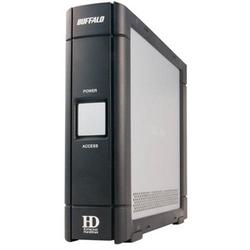
Buffalo_DriverStation_500G.JPGI ordered this Buffalo DriveStation from Frys(Outpost.com) a couple days ago with the lowest price $119.00 I could have ever found for a 500 GB external hardDisk. The other reasons I ordered were that it has 3 connection interfaces (USB 2.0, Firewire 4 pin and 6 pin) and the shipping fee is free.

It arrived at my house 3 days later after I ordered which was amazing considering the shipping was free. I opened the package and was satisfied with the size of this hardDisk. It is not too much huge as what I thought at all.

......

I put the included CD in and the setup wizard is very straightforward. First time I chose the Firewire 4 pin as the connection method, and it just took a few seconds from my computer recognize it after I plug the firewire cable in. Then I checked the disk information, and I found it shows as Samsung driver in my computer. No wonder I was told Buffalo only products external driver case not the disk itself.

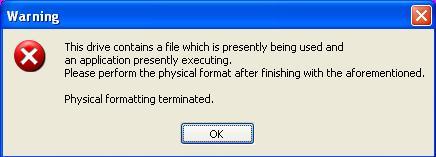
Since I saw the format was FAT32 and the disk space was 465GB, I decided to format it before I use it. But when I opened the included Disk Formatter program, and selected the HD - Samsung driver (Be careful, the external disk is not the default selected one, do not format your internal disk by mistake), I could not click the format command button since it was in gray. I saw the Physical Format button on the top, and I clicked it. After two warning messages, I got another error message as the below to fail the physical formating. (Another fact: I learned the meaning of "aforementioned" from this error message)
Buffalo_DriverStation.JPG

I checked the manual CD, and could not find the reason but I saw the manual uses USB connection as the example. I guess I had to use USB instead of Firewire connection.

I then unplugged the firewire, and connected the include USB 2.0 cable. The set up progress was quick too, and my computer found and show this Buffalo driver very quickly.

Since I got a chance to connect two connections, I did a speed comparison. I dragged a 935MB file from my internal disk to this external driver in both connection methods. Both of them only took less than 1 minute to finish the copy progress, but in 4pin Firewire took longer and initially showed more than 2 minute on the progressing status bar. Since I do not have 6 pin Firewire to test, I drew the conclusion that USB 2.0 connection is faster than 4 pin Firewire.

With USB connection, I clicked the Physical Format button and everything went through. But I am very regretful now, since it will have to take more than 4 hours to finish this physical formatting. It is running when I am typing this blog after my dinner, oh, my.

Other than that, I am very happy about this external disk so far. Oh, I did not mention that it is very quiet with fanless design and auto power on/off with the computer on/off.

Recommend it if you are looking for a cheap medium space external hardDisk.

Buffalo DriveStation Combo Hard Drive - SATA, 500GB, 7500 RPM - External Hard DriveFull production name: Buffalo DriveStation Combo Hard Drive - SATA, 500GB, 7500 RPM - External Hard Drive

Technorati : ,
Del.icio.us : ,

Click here to Read Article As Single Post...

Monday, July 9, 2007

How to download YouTube videos to your local machine

YouTubeI like YouTube since I can share my videos with my family and friend from everywhere the world on it. And I also can watch a lot of interested videos uploaded from everywhere the world. But sometimes I just want to watch some video offline. So how can I download video from YouTube?

Well, there are a simple way and a complicated way as well.

Simple way:

Go to the website VIXY.NET BETA and you will see a text input field on the top which you can type the YouTube video URL you would like to download, and the website will convert the FLV file on YouTube into MPEG4 or others for you to download to your local machine.

According to the website, it converts FLV to MPEG4 faster and less lossy than a typical transcoder.

This service allows you convert a Flash Video / FLV file (YouTube's videos,etc) to MPEG4 (AVI/MOV/MP4/MP3/3GP) file online. It is using a compressed domain transcoder technology (outline in Japanese). It converts FLV to MPEG4 faster and less lossy than a typical transcoder.

When you submit an url, it will download and convert to the video format. Then you can download the converted file.

FLV to MPEG4 Conveter engine is now OpenSource. You can download the source code via subversion: http://sourceforge.net/svn/?group_id=183657

I tried and I successfully downloaded a video from YouTube. But I got problem with other video services, like Sina Vblog etc. I always got a error message from VIXY ".... your YouTube is down?" when I submitted other non-YouTube URL. In this case, I suggest you use the following way.

Complicated way:

As I tried to download videos from other non-YouTube sites, I believe this way will work for YouTube site too. [Updated 7/10/2007, I wrote a Chinese blog about the way too http://weblog.lichao.net/articles/software/30.html]

If you are use IE to watch videos on YouTube (I use IE 7 as the example, so the menu options will be slim different on IE 6 or 5)

  1. Watch the full length of this video you would like to download.
  2. Then go to Internet Options of your browser's top menu Tools.
  3. In Browser History section, click Settings to open Temporary Internet files dialog window.
  4. Click View Files from this window and you will be re-directed to the folder of D:\Documents and Settings\{yourname}\Local Settings\Temporary Internet Files.
  5. Find any files with extension of .flv (Flash Video File) , and copy out to your other folders.
  6. Either to modify this file (like use Macromedia to create a new .swf file by import this .flv file) or download some flash video player software to open it.

Good luck to you all!

Technorati : ,
Del.icio.us : ,

Click here to Read Article As Single Post...

Saturday, July 7, 2007

How to input Chinese without installing any IME software on your computer

chinesemainlogo.gifAnyone using English or Non-Chinese version OS has to install something on PCs to input Chinese language. Before we had Windows 2000 OS, we had to install some software like NJStar. Now with Windows 2000, XP, we can install IME from Regional and Language Options in Windows's configuration. But it will not easy for anyone to install IME on the public computers. How can we input Chinese anywhere without installing IME software?

Well, after searching on Google, I found an alternative way to input Chinese which is Web IME. You just go to a website, and launch the IME webpage. What next for you is to just input ABC and the accordingly Chinese characters will appear. After you select the right character, these Chinese can show in a textarea box for your copying and pasting.

The first one and best one I tested is Cari website from Malaysia. Not only you can input Chinese online, you can also download its program and put on your portable device to use it everywhere. So I just download all web pages, and put them on my own forum site. You can access and test yourself on http://webime.chinatownbbs.com.

Now you do not have any excuses to just input English instead of Chinese on some Chinese blogs.

WEBIME URL: 网上中文输入法

Technorati : , ,
Del.icio.us : , ,

Click here to Read Article As Single Post...

Friday, July 6, 2007

How to fix issues of sending email in ASP.net 2.0 with localhost Microsoft SMTP service

ASP.NETWith the upgrading to ASP.net 2.0, I decided to change all my sending email codes too. Basically I am going to use system.net.mail instead of system.web.mail or traditional CDONT. I thought it would be an easy task, but I still encountered some issues.

I use localhost as my SMTP host and anonymous connection in the web.config file as below.

<configuration>
<!-- Add the email settings to the <system.net> element -->
<system.net>
<mailSettings>
<smtp>
<network
host="localhost"
port="25"
/>
</smtp>
</mailSettings>
</system.net>

<system.web>
...
</system.web>
</configuration>

And the following is my VB.net code:

Protected Sub Page_Load(ByVal sender As Object, ByVal e As System.EventArgs) Handles Me.Load
'!!! UPDATE THIS VALUE TO YOUR EMAIL ADDRESS
Const ToAddress As String = "myname@mycompany.com"
Const UsersEmail As String = "webmaster@mycompany.com"

'(1) Create the MailMessage instance
Dim mm As New MailMessage(UsersEmail, ToAddress)

'(2) Assign the MailMessage's properties
mm.Subject = "Hello, world!"
mm.Body = "This is a message body within ASP.NET."
mm.IsBodyHtml = False

'(3) Create the SmtpClient object
Dim smtp As New SmtpClient

'(4) Send the MailMessage (will use the Web.config settings)
smtp.Send(mm)
End Sub

First, take care of SMTP disabled issue

When I ran the code, and I got the following error message:


An established connection was aborted by the software in your host machine

Description: An unhandled exception occurred during the execution of the current web request. Please review the stack trace for more information about the error and where it originated in the code.

Exception Details: System.Net.Sockets.SocketException: An established connection was aborted by the software in your host machine

Since I knew I was testing on my own desktop and there should be some port disabled issue, especially my company is using McAfee Enterprise anti-virus system. I opened McAfee VirusScan Console and found out the outbound email function (or Port 25) has been disabled on my workstation as part of enterprise policy. To go ahead to test the email feature on my machine, I had to uncheck the first checkbox as you can see from the illustrate below.

VirusScan Console

If you have the same issue, either you remove this rule from McAfee, or change your SMTP server's port number to other available numbers.


2), Fix the unable relaying messages issue

Another error message appeared as the following after I removed the SMTP port rule from McAfee.

Mailbox unavailable. The server response was: 5.7.1 Unable to relay for myname@mycompany.com

Description: An unhandled exception occurred during the execution of the current web request. Please review the stack trace for more information about the error and where it originated in the code.

Exception Details: System.Net.Mail.SmtpFailedRecipientException: Mailbox unavailable. The server response was: 5.7.1 Unable to relay for myname@mycompany.com

I do not know what exactly network setup caused this problem (probably my workstation is not in the same subnet with my mail server), but I had the same experience before in traditional asp 3.0 web pages. So I took the same steps to resolve this problem.

  1. Open IIS administrative console by clicking Control Panel --> Administrative Tools.
  2. Expand Default SMTP Virtual Server and right click Domains --> New --> Domain...
  3. On next screen, specify the domain type is Remote.
  4. Type your new domain name. In this case, it should match your mail recipient's domain name, for example mycompany.com and click Finish.
  5. Select the new domain you just created, and right click to open Proprieties window.
  6. Check the first check box to Allow incoming mail to be relayed to this domain.
  7. blog_smtp_domain.jpg
If your machine can know how to connect to your company's mail server, then you are done here. Otherwise, you should put your relaying mail server's IP or server name in Forward all mail to smart host box.
Please remember, when you enter IP address in the forward box, please use [] to enclose the IP address (like in [192.168.2.1] formate).

To make sure your company's mail server (in most case, it is Exchange server) can relay all emails generated from your work stations or web servers, 1) add the name domain in SMTP service as "*.com" or "*.net"; 2) or add your mail server as the Smart host.

blog_smtp_smarthost.jpg

Note: You might need to make such above modifications on your testing working station, and it might not be necessary applicable for your production web servers.

My Next Step

Of course, since there are too many issues to use localhost to send out emails in ASP.net 2.0, it is not recommended to do so. Next task for me is to connect to my exchange server to send emails from ASP.NET. I will post it soon. Thanks for reading.

Technorati : , ,
Del.icio.us : , ,

Click here to Read Article As Single Post...

Thursday, July 5, 2007

How to forward traffics from my blogger to the same post on my WordPress blog

BloggerBefore I moved all my blogs to my own WordPress blog platform (http://eblog.lichao.net), I was using blogger (http://lichaonet.blogspot.com) to write articles. I like my wordpress blogs now, but I still want to keep posting new articles on the blogspot site. First, I can use it as my backup or mirror blog sites. Second, I personall think that the blogger is better on Google search than wordPress blogs. But it is very difficult to manage multiple blogs on the same topic. One of these challenges is to centralize all the comments on only one blog site.

Since the wordpress one is my main blog site, I try to collect all blog comments on this blog. What I need to do is to 1) disable all comments feature on other mirror blog sites; 2) create a link to forward all visitors on mirror sites to my main blog for commenting.

1) Hide comments on blogger site

Log onto blogger.com and select Setting --> Comments. On Comments page, you can select Hide to hide all existing comments and the links to post comments.

When you save setting and re-publish your blog, you will see all comments disappear, so do the number of comments on each post and comments section at the end of posts.


2) Make a link to the new blog site

Now I want all visitors who first enter my blogspot site to see a link to point them back to my new blog site, then they can leave their comments over there.

I can manually put the perm links of each post on the mirror site, but this way will increase my workload extremely.

Yes, I can just put a link to the front page of my main blog site (http://eblog.lichao.net) on every post by changing the tempate HTML. But it will cause problems for visitors who have to look for the individual posts on my main blog site.

In theory, I can programmingly insert a perm link to the individual post. But unfortunately my Blogger and WordPress use different Perm Link pattern.

Here is the comprise way I could think of, to insert a title search link to eblog.lichao.net on blogspot since both main blog and mirror blog posts are on the same post title.

In new version of blogger

Dashboard -->Layout --> Template --> Edit HTML. And check Expand Widget Templates check box.

In the HTML text area, I locate the tag of <b:if cond='data:blog.pageType != "item"'><b:if cond='data:post.allowComments'> ,and insert my own link before this tag.


<!-- added on 2007-07-06 to link back to my main blog -->
<a class='comment-link' expr:href='"http://eblog.lichao.net/?s=" + data:post.title'>View Comments</a>

The data:post.title in above code can automatically display the same post on search result of my main blog site.

One more place you should edit too, which is the comment section after each post. I locate the tags

<b:includable id='comments' var='post'>
<div class='comments' id='comments'>
<a name='comments'/>

<b:if cond='data:post.allowComments'>

and insert the following codes between them, so the final code looks like

<b:includable id='comments' var='post'>
<div class='comments' id='comments'>
<a name='comments'/>
<!-- added on 2007-07-06 to link back to main blog -->
<a class='comment-link' expr:href='"http://eblog.lichao.net/?s=" + data:post.title'>Please click here to leave your comments</a>
<b:if cond='data:post.allowComments'>

Classic version of blogger

There are a little differents in the classic version. In classic, I use "<$BlogItemTitle$>" to pass the post title to the new blog site.

Open Edit HTML from Template, and locate the tags of

<p class="post-footer">
......
<BlogItemCommentsEnabled>
<a class="comment-link" href="<$BlogItemCommentCreate$>"<$BlogItemCommentFormOnclick$>><span style="text-transform:lowercase"><$I18NNumComments$></span></a>
</BlogItemCommentsEnabled>

And insert my own following code after the tag of </BlogItemCommentsEnabled>.

<!-- added on 2007-07-05 to forward traffic to new weblog site -->
<a class="comment-link" href="http://eblog.lichao.net/?s=<$BlogItemTitle$>" target="_blank"><span style="text-transform:lowercase">Comments</span></a>

I did the same for the comment section of each post which is usually after the tag <!-- Begin #comments -->
. Here is the final code for comment section.

<!-- Begin #comments -->
<ItemPage>
<div id="comments">

<!-- added by Chao on 2007-07-05 to forward traffic to new weblog site -->
<p style="padding-left:20px;">Thank you for visiting, please go to<a href="http://eblog.lichao.net/" target="_blank">my main blog site</a> and leave your comments over there. To locate the same topic, please click the link on <a href="http://eblog.lichao.net/?s=<$BlogItemTitle$>" target="_blank">Search Page</a>.

<BlogItemCommentsEnabled><a name="comments"></a>

-- The End --

Technorati :
Del.icio.us :

Click here to Read Article As Single Post...

Video Bar

Loading...

Sponsor Ad.